Total Cost of Ownership – Inkjet vs Laser Printers
Today I was printing off Christmas letters to send off in the mail when I realized I had the perfect blog post sitting right underneath my desk. The printer! Sometimes I take for granted frugal choices that we made years ago.
Consumers today have two distinct choices when it comes to home printers, inkjet or laser.
Inkjet Printers
Chances are, this is the type of printer that you have in your home. These printers often come with additional features besides printing, such as built in scanners and copiers.

The majority of the inkjet printers sold are capable of printing glossy color photos, provided you have a color ink cartridge. An inkjet printer works by shooting liquid ink onto the media (paper, card stock, or what have you). That liquid dries by the time the page finishes printing.
Pros
- Low sticker price
- Can print glossy photos
- Includes a scanner
Cons
- Ink replacements are costly
- Slow to print many consecutive pages
- Water will cause ink to run
Laser Printers
This is most likely the type of printer at the office. Laser printers work differently than inkjet printers, surprise surprise! A laser shoots a drum that builds up static electricity. That static attracts toner, powdered ink, to stick to the page. Finally the toner is permanently fused onto the page.

Pros
- Very Fast Pages/Minute
- Toner is economical per page
- Crisper text
Cons
- Higher initial sticker cost
- Color is not a basic option
- Takes a while to warm up and start printing
Cost of Ownership Comparison
We have a laser print, almost the same model as shown in the above picture. I did a little research and found some numbers on Amazon and vendor sites to put together a total cost of ownership comparison between an inkjet and a laser printer.
For the inkjet printer, I tried to find a basic printer without a scanner or wireless. The Canon Office Products IP2820 seemed to fit the bill, and at a meager $29.99 price point it sure seemed like a painless purchase.
The Canon uses PG-245XL black ink cartridges that run $23.99 on Amazon and have a claimed page count of 300, although reviews say it is more like 200 pages before becoming unusable. That puts the cost per page between 8-12¢ depending on who you believe.
For the laser printer, I tried to find the closest model to the one we have and found the Brother Monochrome HL2230 for $76. It uses the TN-450 toner cartridge. The TN-450 costs $49.95 on Amazon and has an expected lifetime of 2600 pages or 1.9¢/page. Also, the HL2230 comes with a starter cartridge that is only rated for 700 pages.

Then I calculated out the cost of ownership over the first 1,400 pages. Why 1,400? That is how many pages we have printed so far with our printer according to its information sheet (press the Go button three times, your printer may have a similar diagnostic detailed in the user manual you threw away years ago).
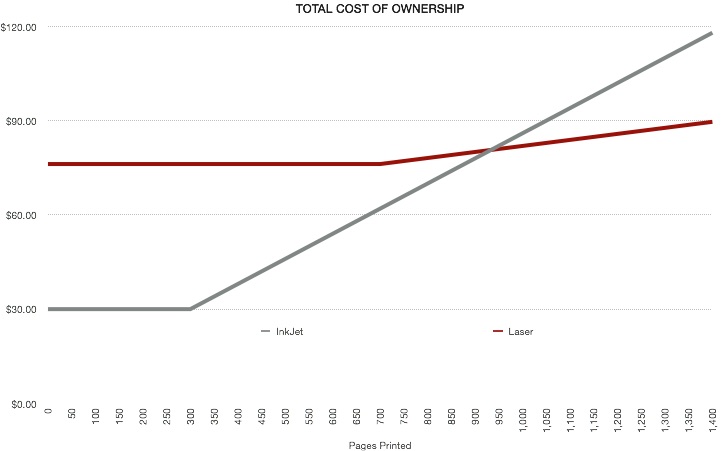
As you can see, it becomes cheaper to own a laser printer around 900 pages. If you tweak the original parameters a bit and use the less favorable 200 pages/ink replacement you get an even uglier picture for inkjets.

 Now the breakeven is closer to 600 pages.
Conclusion
We’ve saved between $28.36 and $84.36 so far by using a monochrome laser printer. If you really want to print off photos, let your local photo center handle it or better yet, use some of the free 4×6 prints that places like Snapfish are constantly offering.
You don’t have to take my word that laser printers are cheaper to operate, just ask the folks over at Wired, who claim that using champagne would be cheaper than the ink cartridges that seem to only last a few dozen pages.
We replaced our starter toner at 764 pages, a bit above the stated expectancy. We still have another 1,959 pages to print before we have to buy more toner.