It’s been 6 months since the last time I negotiated a lower internet bill. As you may recall from that earlier post, I went from a $30 bill for 25 Mbps to a $35 for 50 Mbps and access to Streampix. This month, my bill was set to increase to $84. Time to pick up the phone and renegotiate.
As always, it is a good idea to have some goals and expectations beforehand. I looked up the only competitors advertised rates and they had increased $5 across the board. We wanted to keep our internet bill under $50 a month, and if we had to switch companies that would have put us at $45 for a 12 Mbps connection.
After working my way through the menu prompts, I got in touch with a human being. Our new deal for the next 6 months is $20 for a 25 Mpbs internet connection. We dropped Streampix and there were no tears shed. We tried it out once in the past six months and not only was the movie selection skimpy, but the user interface was a pain. I’ll happily continue shelling out $8 a month for a far superior Netflix experience.
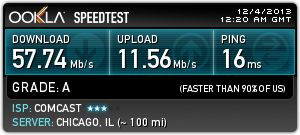
The drop in internet speed isn’t even all that bad. When we upgraded six months ago there was no noticeable difference in browsing and streaming. It appears that there is a bottleneck somewhere beyond the last mile.
In conclusion, 10 minutes on the phone yielded a 76% decrease in cost while only reducing our service 50%. I call that a win.
A while back my Mom visited and handed me an envelope full of savings bonds that I had left sitting in my parents safety deposit box. I didn’t know much about the bonds other than most had been birthday and Christmas gifts when I was a kid and that they were all still earning interest.
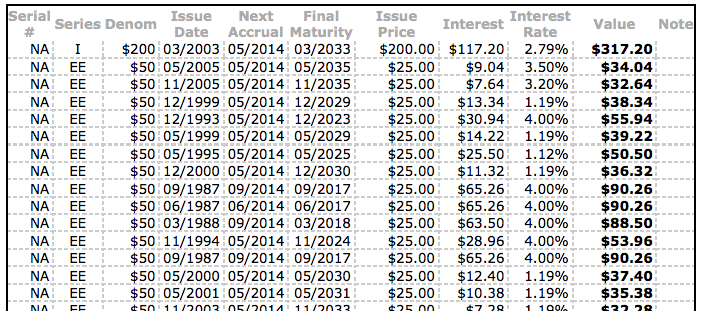
Today, I finally got online to do a little homework and see whether it was better to redeem them now or hold on to them and keep earning interest. If you have savings bonds tucked away somewhere you can look them up online and see all of the relevant information about them on TreasuryDirect.gov.
I was particularly interested in “Interest Rate”. As you can see, some of the bonds are still earning an excellent 4% return. That is a safe, guaranteed 4%. You’d have a hard time beating that kind of risk/reward anywhere else right now. Some of the bonds however were earning around 1%. While 1% is much better than the average savings account or CD today, I know I can put that money to better use.
So where can you find a safer, higher interest rate? Try your home mortgage. By redeeming all of the bonds that are earning a lower interest rate than our mortgage, and putting that money towards our mortgage in the form of an extra lump sum payment, we can save more money in the long run than if we let the bonds reach maturity date.
By my back of the envelope calculations, we shaved off 4-6 months of payments from our mortgage.
There are a couple of other advantages to doing something like this.
The risk of losing the paper bond is gone
Paying down debt is a mental reward
You are trading one long term investment for another (helps to keep your liquid, semi-liquid, solid percentages stable)
Yes, I know that Savings Bonds are more liquid than real estate, but given the nature that most savings bonds have a maturity date of 30 years and the most common mortgage is also 30 years, I found it to be an apt comparison.
A big thank you to all of my relatives (you know who you are) that gifted savings bonds to me all of those years ago. Kids don’t get the most excited about that kind of gift, but it is an excellent gift that they will appreciate more later on in life.
Great news! Frugal Boy’s social security card came in the mail today making him an official drone of the system. His future earnings will power my retirement. He doesn’t seem to like that concept much at the moment however.
A big advantage of having a SSN is that all sorts of financial doors are now open to him. He can now have a bank account to safely save money and even more importantly, he can now be listed as the beneficiary of a 529 college savings plan.
What is a 529 Plan?
SavingForCollege.com describes it as,
A 529 Plan is an education savings plan operated by a state or educational institution designed to help families set aside funds for future college costs. It is named after Section 529 of the Internal Revenue Code which created these types of savings plans in 1996.
My own simplified explanation is that a 529 savings plan works in much the same way as a Roth retirement account. You contribute post-tax money to the 529. That money then grows through increases in the stock market until the beneficiary of the account withdraws the money for educational expenses. If that was too confusing, think of it this way. A 529 is a legal loophole that the IRS created to encourage parents to save money for their kids future without the normal taxation that would be applied. The only condition that the IRS puts in place for not taxing the growth in the investments is that the money must be used towards education.
How do I setup a 529?
Start by finding who manages your state’s plan. Vanguard has put together a handy state map that will make this and comparison shopping easy. Each state offers a 529 plan. You do not have to use your state’s plan. For example, we live in Illinois, but we could enroll in the Nevada 529 plan. It also does not matter where the college is located. If you want your son or daughter to attend an Ivy League college, you do not have to use one of those state’s 529 plans.
We decided to use the Illinois 529 plan (Bright Start®; College Savings Program (Direct-sold)). We can deduct our contributions on our state taxes and the minimum amount to open an account is astonishingly low (only $25).
Bright Start advertises that it only takes 15 minutes to enroll. If Frugal Boy hadn’t been fussy, that might have been true. I did like the fact that you can setup a monthly contribution from your checking account. We started off with a small monthly contribution. It is money that we have saved by being frugal and cutting costs elsewhere in our lives. This is part of the reason why we lead a frugal lifestyle, so we can put money towards things that will make a meaningful impact. Even with a small monthly contribution, the amount set aside by the time Frugal Boy starts college will have grown substantially. Investing and savings favor the young.
Now that his 529 is set up, any gift money he receives will be put towards his education savings unless specified otherwise. Thank you all of those who gifted money to Frugal Boy. That money has been socked away for his noggin later in life!
For the past couple of years we have been doing the bulk of our grocery shopping at Kroger. Kroger is one of the largest chains in the US, has decent prices, a modest selection, fuel center discount, and most importantly, three locations in town with one within walking distance. We didn’t always shop at Kroger though. Back when we were living frugally by necessity we did the majority of our grocery shopping at a different supermarket.
I wanted to do a post about that supermarket and coincidentally, I needed to get some shopping done. So what is the name of this mystery store? Before I tell you, let’s have a pop quiz. Look at the picture below, and pick out the more expensive bottle of garlic powder.
Have your answer?
Good.
If you said the one on the left cost more, you’re wrong.
If you said the one on the right cost more, you’re wrong.
If you said, “I know you Andrew and this is a trick question. They cost the same.” Then BINGO you are the winner. Yep, these two containers of garlic powder both cost $1.00. The one on the left is 5.5 oz and the one on the right is less than half of that at 2.0 oz. The smaller one came from Kroger’s value brand (aka the cheap generic store brand), the bigger one came from Aldi.
You may be asking yourself, what is Aldi? Don’t only poor people shop there? What’s the deal with the shopping carts? Let me put all of your questions to rest.
Aldi is a German supermarket chain that is found world wide. Like most things German, there is a high emphasis on efficiency. You’ll see that before you even enter the store because you will need to cross barrier #1.
#1 The Shopping Carts
The first step to making a more efficient supermarket is to cut jobs. What jobs can be cut with a little ingenuity and customer training/education? The cart boys & girls. As you step out of your car, one of the first things that you will notice is that ALL of the other shoppers are thoughtfully returning their carts to the singular cart coral on the side of the building.
Wow! What thoughtful and kind people. Haa, they just want their quarter back. You may have noticed the red chains on the cart handles. Those are a part of the cart return system. In order to get a cart, you have to deposit a quarter into the cart. It then unhooks from the other carts and you can go about your shopping. When you’re all done, you return the cart to the coral and hook it back up. You get your quarter back and go on your merry way.
Once you have your cart and are inside the store you will notice a couple of obvious things.
#2 The Store Interior
Probably the first item to catch your attention is that there are no shelves per se. Instead most of the merchandise is in boxes and those boxes are on palettes. By eliminating the extra work needed to stock shelves in the traditional manner, Aldi is able to cut down on employee hours and that, like the cart situation, saves you money. The second item that you will likely notice is that there is typically just the generic brand of each product. I don’t know how many hours of my life I have spent standing in an aisle trying to figure out the best bang for my buck among 10 different brands each with 3 different sizes. With Aldi, you generally get 1 brand and 1 size of each item. Grab it and move on, no dilly daddling here. That brings me to the 3rd point about the store interior. It discourages back tracking. If you forgot something at the start of the store, have fun fighting against the stream of budget conscious shoppers in the one way flow. The stores are designed fit all of the merchandise in the smallest footprint possible. A smaller store saves money in construction costs, land acquisition, and utilities. All of those savings are passed on to you.
#3 The Checkout Process
You won’t find any self checkout lanes at an Aldi. Nor will you see any baggers. Chances are good that there will only be 1-2 lanes open, but man do those lanes fly! Each item sold at the store is riddled with barcodes. The smart folks at Aldi decided that having a barcode on each side of a product (6 for boxes) means that the cashier doesn’t have to try and find it. They simply slide everything through the scanner and place it in an empty cart. Bagging is something that you are going to have to do yourself, but not at the checkout lane because that would slow down the process for the next person in line. Instead there is a large counter where you can bag up your groceries. Don’t forget to bring your own bags, Aldi doesn’t have plastic bags and charges money for their canvas totes. One last important note about the checkout process. Bring your debit card or a wad of cash. Aldi doesn’t accept personal checks (do people still use those at stores?) or credit cards. Credit cards cost merchants a % of the transaction (usually 1-5%), so by saying no to credit cards, Aldi can pass that saving on to you.
Conclusion
There you have it. Aldi is a great discount supermarket that saves you money by eliminating cart boys, baggers, stockers, cashiers, large store footprints, loyalty programs (yes those cost you money) and credit card fees. Do poor people shop there? Yes. Do rich people shop there? Yes. At the end of the day, it largely comes down to convenience. Is there a store close to you? Do you mind making a second stop at another store to pick up anything that isn’t carried at Aldi? Can you remember to leave a quarter in your car and some bags?
I still have memories of my childhood where my Mom would stock up at Aldi once a month to feed 4 very hungry boys. I am sure that the money saved by doing so contributed to vacation funds that let us see the world. Thanks Mom!
Ahh the cable bill. If ever there was a archetypical love/hate relationship between the American household and a service provider then this has to be it. On the one hand, people love tv, and internet connectivity has become almost an essential utility (especially for the younger generations). However, people hate the prices that they pay for these services. If you want to see what I’m talking about, check out the Consumerists annual “Worst Company in America“. Comcast, Time Warner, Direct TV, Dish, Cablevision, AT&T, and Verizon make regular appearances and often fare quite well (err, bad) in the bracketed tournament of hated companies.
I would consider us lucky because where we live we actually have a choice between two internet providers, Comcast and Frontier. Back when we rented an apartment, we used Frontier and paid about $42/mo (after all the taxes and fees) for a 7 Mbps internet connection. Mbps stands for mega bits per second and shouldn’t be confused with MBps (mega Bytes per second). Generally, whenever you see internet speeds folks are talking about bits. There are 8 bits in a byte so a 8 Mbps is the same as 1 MBps. Confused? Good, let’s move on.
When we moved into our house 6 months ago we decided to try out Comcast’s internet only service. Comcast frequently runs promotions for new customers where you pay a set rate for the first 6 months of service and then they jack up that rate for the next 6 months and then you end up paying the ‘retail’ rate from then on. You are free to cancel at any time so I figured I’d give it a go. Our promo deal was for a 25 Mbps connection for $30, then it would bump up to $50, and finally to $65.
November was our first month at the $50 level and I already knew what I was going to do back when I signed up. I called Comcast to negotiate a lower rate. 20SomethingFinance.com has a nice how to that I roughly followed. There were a few differences and some omissions that I think merit some discussion.
Before calling, do your homework and see what other companies are offering, this is extremely important!
After dialing the number, the menu options are a bit different than what he has listed so don’t blindly hit #4 followed by #2 or you may end up ordering “Chairs, Rails, & Extreme Wrestling Pay per View”.
After getting a retention/cancellation rep they will ask for your account details, address etc. It will seem like they are going to happily cancel your services without even giving you a chance to negotiate. Don’t worry, we’ll get to that in a second, just stay calm and confident.
Finally, after verifying your account the rep will drop a short little line like “why are you leaving?” That’s your cue!
Explain the fantastic deal the competition is offering and make sure to stress that your current bill is too high. If there is no competition in your area, they probably know and you’ll need to get creative.
Be patient and friendly, especially if they put you on hold.
If you get a counter offer, make sure you understand it. If you don’t like it, either try calling again or cancel your service. This is where doing your homework before hand pays off.
I looked up Frontier’s rates and they had indeed changed from our renter days.
$30 – 6 Mbps
$40 – 12 Mbps
$50 – 24 Mbps
The Comcast rep offered me a 50 Mbps connection good for the next 6 months for $35/mo, a credit for this month, and access to streampix, Comcast’s (weak) version of Netflix. Yes sirree. Sign me up. Amount saved over the next 6 months by making one simple phone call, $90. Time spent on phone, 9 minutes. Internet speed twice as fast, cherry on top.