• About Me
  • Contact Me

Frugal Living

Indulging in life, financially responsible

Savings

Appealing Property Taxes Part 1

September 26, 2013 by Andrew Leave a Comment

death_and_taxes

When we bought our house back in May we made a list of projects that we wanted to complete within the first year of living here.  One of those items was to appeal the property taxes and hopefully cut them down a little bit.

We have the exact opposite problem that my parents do.  My father likes to complain about how much his county taxes income (which affects him) and how little they tax property (which mostly affects farmers where he lives).  Our county likes to tax both, because we live in Illinois, but the difference in what we pay in property taxes versus what some of my siblings pay in neighboring states is staggering.

In our county, the property tax is figured in this way:

CodeCogsEqn

Assessed Property Value should represent what a property (land + any buildings) would sell for on a fair and open market.

There are a few Deductions that property owners may qualify for.  The most common is the Homestead deduction that qualifies owners who live in that property for a $6000 reduction.  Other deductions include Senior Citizen Freeze and Home Improvement.

0.0786644 is the current tax rate.  It could also be written as 7.87%.  Ouchie!

bigstock-Cartoon-OUCH-Vector-201473722

Understanding How Your Bill Is Figured

Regardless of where you live in the United States, your property values and tax rates are considered public record, meaning that anyone can look them up.  In fact, for our county, you can do so from the comfort of your own home simply by going to the County Assessor’s website and doing a search.  This can be extremely helpful when deciding whether or not you should appeal your property taxes because it is very easy to see what your neighbors are paying for the same government services that you are receiving.

Our 2012 property tax bill (that we thankfully did not have to pay because we bought the house in 2013) was $4,368 based off an assessed market value of $184,605.

gif.latex

$184,605?!  We bought the house for $149,900, again you can see purchase prices and even mortgages as part of public records.  Additionally, the appraisal that was done on the house in March estimated the property at $158,000.  Hmmmm, it sounds like that status quo is way overvalued!

Overpaying?  What You Should Do

There are some very strict rules in our county for appealing your property assessment (and hence your taxes).  You can walk into your township assessor’s office anytime of the year and informally appeal your assessment.  This should prompt the assessor to take a look at your property and update their numbers.  This is exactly what I did in July.  I handed over a copy of the appraisal with the $158,000 number and was informed that 2013 assessments would be mailed out in September.

Fast forward to last week and I saw a letter from the assessor’s office in the mailbox.  Nervously, I opened it up to see if my nonchalant plea had been successful.  As I quickly scanned the wall of text I saw that our assessed value had been lowered 1%.  Woohoo?  Wait a second, everyone in the township had been lowered 1% because of falling home values.  This wasn’t a success at all, they didn’t even bother to reevaluate our property!

It was time for a formal appeal.  In our county, you have 30 days from when you receive your written assessment to file a formal appeal to the board of review.  As with any government interaction, a formal appeal starts with a form and ends after approximately a ream of paper.  After about a day, I had finished researching, filling in, writing, and printing a 2 page form with 39 pages of supporting evidence (okay the appraisal itself was 35).  You’ll need it all in triplicate (because bureaucracy) and away it goes into the mail.

After all of that, the number I put on line 6, What is your opinion of market value on January 1, 2013?, was $156,261.  I came to that number after arguing the value several different ways (recommended by the instructions included with the form).

1.) Purchase Price

We purchased it a for a lot less than it is currently valued at.  Our supporting evidence was the settlement statement that broke down the $149,900 purchase price.

2.) Appraised Value

Appraisers have to be certified in order to work.  They don’t (shouldn’t) pull numbers out of thin air nor should they be biased.  We included the 35 page appraisal as part of our appeal evidence.

3.) Neighboring Assessments

Remember when I said you can look up your neighbors tax bill?  Well, I did and found out that on average they are paying 11% less than we are while living in similar sized or larger houses that are in better condition.

4.) Incorrect Property Data

The county figures your assessed value by looking at how much land your property sits on, how many square feet of living space you have, how many bedrooms and baths are in the house, and a bunch of other quantitative and qualitative data.  If those records are incorrect then you can argue on those grounds as well.  I noticed several discrepancies between the counties records, appraisal report, and my own observations.  For instance, the county believes that we have 300 square feet of finished basement space.  While I can see evidence that at one point there was some finished space in the basement, there certainly isn’t anymore.

 Cost Analysis

Now that our formal appeal is in the mail there isn’t much I can do about it.  The way I figure it, best case scenario is that they accept my new proposed valuation, $156,261, and our property tax decreases from $4,368 down to $3,625.

gif-1.latex

That would net us savings of $743 per year!  Even if the board of review does nothing, aka as the worst case scenario, we are only out the time invested in filing the appeal and the cost of materials/postage to do so.  Printing and postage combined was $38.54.

I will write a Part II (Updated click here for Part II) after I hear back from the Board of Review and see how successful our appeal was (or wasn’t).  I think we have a pretty strong case and like any *good* government function, we can appeal the appeal!  Huzzah for bureaucrats everywhere!!

Posted in: House, Savings Tagged: Taxes

Reassess Who Hosts Your Website

September 4, 2013 by Andrew Leave a Comment

About two weeks ago I received an automated email from macminicolo.net to let me know that my hosting contract was coming up for renewal.  For those of you who are unfamiliar with MacMiniColo, it is a business that places either a leased or owned Mac Mini into a secure datacenter.  While customers don’t have physical access to their minis, they can do almost anything with them remotely.  In 2009 I sent a mini to the datacenter so I could host several business websites and run my own email server.

Mac Mini (2009)

Macminicolo

The reason why I opted to use MacMiniColo in the first place versus using a more well known web host such as GoDaddy was because in 2009 there weren’t many web hosts that accommodated Ruby on Rails.  My options at the time were limited to paying an exorbitant monthly fee for a dedicated server, or to buy my own server hardware (a mac mini) and setup the machine someplace where it would have an always on, super fast internet connection.  I chose the latter.

Life hummed along just dandy until two weeks ago when I got that renewal notice and it made me think.  I haven’t used Ruby on Rails for years.  In fact, I probably didn’t need a dedicated server what-so-ever!  It was time to reassess what I needed to run my business and personal web presence.

The first thing that I needed to do was to get in touch with the owner, Brian, of MacMiniColo and see if there was any room to negotiate the base price.  Brian is a nice guy and if I could strike up a deal it would also save me the tedious task of moving 3 websites and a dozen email accounts to somewhere else.  His response was pretty much what I expected, $31.50/mo was the lowest he could offer.  I was confident that I could find someone out there that would meet my needs for less than $378/year.

Host Gator

I did *some* research and decided to migrate over to HostGator.  They are like pretty much every other hosting company out there in that they offer shared, semi-dedicated, and dedicated servers.  With the Mac Mini, I had a dedicated server and all of that machines resources were devoted solely to me.  Generally speaking, a website doesn’t take many resources to run, so many small businesses and individuals (myself included) opt to save money by going with a shared server.  It is exactly what it sounds like.  Many different websites are hosted from the same machine.  By switching from a dedicated server to a shared server and using a promotion that HostGator was running I was able to cut my yearly web presence cost down to $71.78, or $5.98/mo.

Host Gator


Unfortunately, the honeymoon didn’t last long.  Within a week, both my brother, who piggybacks a website on my hosting, and myself noticed that our respective websites were loading far slower than when they were being served by the Mac Mini.  I did some more research and discovered that Host Gator had recently been bought out my mega conglomerate EIG, Endurance International Group.  EIG owns a whole bunch of web hosts, see a list here, and had recently been moving Host Gator customers from a datacenter in Houston to one that they owned in Provo.  Their Provo datacenter had a major malfunction in early August, that took out HostGator, BlueHost, and HostMonster customers for the better part of a day.

Overcrowding of shared servers plus a spotty track record made me rethink the three year contract that I had just inked.  Did I really want to risk spending the next three years with them?

MDDHosting

MDDHosting

Nope! There is a reason why money back guarantees exist.  HostGator offered a 45 day return policy so after doing some better research and migrating to MDDHosting I took full advantage of it.  MDDHosting is a smaller hosting provider and more importantly, the owner claims that he won’t accept a buyout from EIG.  Switching from HostGator to MDDHosting was a breeze because they both use similar backends (CPanel).  All I had to do was submit a transfer request to them, the tech that I talked to said they get tons everyday.

My websites, this one included, load much faster and more reliably now that I am with MDDHosting.  The best part is that I saved even more money by switching to MDDHosting.  I locked in a three year contract for only $37.38/year or just $3.12/mo.

If I had accepted the status quo, I would have lost out on $1,021.87 over the next three years.

Oh, and one last thing.  Since I purchased the original mini, it is still mine.  I should be receiving it in the mail/UPS/Fedex within the next week or two.  At that point I can either sell it on eBay or use it to replace one of our home computers.

Are you hosting a website?  With whom are you hosting it with?  Have you ever considered getting your own personal domain name (e.g. andrewschenk.com)?

Posted in: Savings, Technology Tagged: Hosting, MDDHosting, Website

Trimming the Phone Bill, Part 2

September 3, 2013 by Andrew 2 Comments

If you haven’t read part 1 yet, then you can see it here.

…Continuing on…

GoPhone prepaid wireless service was saving us a lot of money and we were happy with that for several months.  However, nothing is sacred on our budget, and when I was looking over numbers a month ago I was convinced that we could save even more money without sacrificing any change in lifestyle.

I began looking for alternatives and was intrigued when I read a blog post on mrmoneymustache.com.  Mr. MM goes into considerable detail so I will provide a synopsis of sorts.  By switching from AT&T’s prepaid GoPhone service to Airvoice Wireless we could get a comparable level of service for only $10/mo per phone.

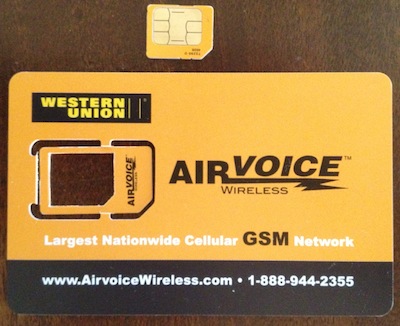
Airvoice Wireless

Airvoice is one of dozens of MVNOs, Mobile Virtual Network Operator.  You can think of an MVNO as a reseller who buys network coverage and airtime from AT&T and then sells it in different packages to customers.  Of course there are MVNOs that do the same thing for the Verizon network.  In order to switch from GoPhone to Airvoice we had to do a few things.

1.) Purchase new SIM cards

While it may be possible to switch over to the AirVoice network and retain your original AT&T sim card, Airvoice cards can be found pretty cheaply ($5) online.  There are several different sizes available nowadays thanks to the smartphone race for thinner devices.  Our

iPhone 4S phones required micro sim cards.

micro sim

2.) (Optionally) Port Your Phone Number

Airvoice Wireless makes it easy to keep your phone number.  Just fill out the form on their website and within a day or two your new SIM card will have your old phone number attached to it.  When GoPhone got our port request they terminated our account.  We knew this was coming, but it’s worth saying that any credit or account balance that you had with them gets wiped out (i.e. if you had $5 in your account it is theirs now).

3.) (Optionally) Enable Data & Texting

By default Airvoice has texting and data disabled on new accounts.  You simply have to give them a call and ask for them to enable it for your account.

Here is what $10 gets us each month with Airvoice:

250 minutes or 500 text messages or 30mb of data or some combination of all three.

We’ve only been with Airvoice for a week or so and I still need to switch over Shae’s phone.  There are a few key differences between the two prepaid services.  I like some of them and others I’m not terribly fond of.

Pro’s of Airvoice:

  • Cheaper than GoPhone with similar features
  • Don’t have to explicitly add a data package (saves us $5 when we travel and want maps/email on the road)
  • Same network coverage
  • Unused dollars rollover to the next month

Con’s of Airvoice:

  • A message pops up on the phone after each action that costs money.  For example if I send a text a popup appears on the screen telling me how much it cost, $0.02, and my remaining account balance.  Some people might find this helpful, but I wish I could limit it to once a day or once a week.
  • Their website is very lacking.  While auto refills can be set up.  It takes some digging to find where and how to do it.
  • Visual voicemail does not work.  With GoPhone it would work so long as you had a data package.
  • Account balance will expire unless you add to it every month.  For example if you skip a month you lose service.

So there you have it.  We started off a couple of years ago spending $113/month for phone service and once we finish switching over to Airvoice we’ll be spending just $21/month.

We will save over $1100 a year in our phone bill by paying only what we need and not a penny more.  What could you do with an extra $1100?

Pssst, the correct answer is to invest it, earn 5% return for 20 years, and have an extra $16k in interest for a grand total of $38k.  Is your phone really that important to you?!

Posted in: Savings, Technology Tagged: Airvoice, Phone, Utilities

Trimming the Phone Bill, Part 1

August 29, 2013 by Andrew 2 Comments

Keeping a budget is almost a necessity for living a responsible financial lifestyle, but looking for ways to cut some expenditures is a great way to live more frugally.

I like to look at recurring monthly expenses because while they often seem small, over time they add up to a large amount.  A great example of a monthly expense is the cell phone bill.  Not only are there many options available for consumers in this day and age, but there is also the multiplication effect from households often having more than one phone.  Shae and I each have our own cell phones so each dollar we can shave off the monthly plan actually saves us two dollars.

In this two parter series, I will share how we have saved hundreds of dollars by not accepting the status quo.

In The Beginning…

A couple of years ago we made a financial mistake.  We bought brand new phones on a two year postpaid contract.  Telecoms such as AT&T, Verizon, and T-Mobile incentivize contract plans because they are proven money makers.  Customers buy a new heavily subsidized phone (some are even subsidized down to $0) and then over the next 24 months they pay a higher monthly bill to pay off the original phone cost.  In our case we had purchased the cheapest iPhone 4S models and went with AT&T’s cheapest contract plan.

iphone4_att1

iPhone 4s on AT&T

This set us back $200/per phone upfront and $56.62(with taxes and fees)/mo per phone.  Yep… not very frugal. Surely, we must have been getting exceptional services for a combined monthly phone bill of $113 per month.  Each plan came with 450 talk minutes, unlimited SMS (text messages), unlimited nights/weekends/mobile-to-mobile, and a paltry 200 mb of data (used for connecting to the internet).  Suffice it to say, there were better options out there.

Spending Money to Save Money…

Yes, it is true.  Sometimes you have to spend money to make/save money.  Part of every postpaid cell phone contract is an early termination fee, etf.  Should you decide to prematurely end your two year bondage with the telecom you will face a penalty.  AT&T calculates this penalty based on how many months are left on your contract.  If I recall correctly, it started in the $300 range and decreased by $10 for every month you had fulfilled.  Details can be found on your own telecoms website.

After finding a compatible prepaid plan, more on that in a second, we set up a spreadsheet and calculated if we would save enough on the new plans to offset the cost of the etf.  It just so happened that it would.

GoPhone GoPhone is AT&T’s prepaid option.  It works a lot like their postpaid with several key differences.  Here are a list of similarities:

  1. They both use the same cell network, if you have coverage on one, you’ll have coverage with the other type of plan.
  2. They both can use your existing SIM card (SIM cards are small chips that identify your phone to the cell network.  Your number is associated with your SIM).
  3. You can keep your same phone number.
  4. You can access the internet with the same speed.

The differences mainly come down to billing.

  1. GoPhone you pay for the month that is about to start, PostPaid you pay for the month that just ended.
  2. GoPhone has some cheaper options for infrequent talkers/texters.
  3. You use a different website to manage your prepaid or postpaid accounts even though the money ultimately goes to the same company.

Out of all of the prepaid GoPhone plans, we felt that the $25/mo per phone plan best met our needs.  It offered 250 minutes of voice and unlimited texting.  Any data usage would cost us an additional $5 for 50mb (about enough to check your email for a month).  Since there is an abundance of free WiFi in the places we frequent during our daily schedules we skipped the added data package and cost.  The total monthly cost per phone was now $27.32 with taxes and fees.  When you add up both phones in the household our new monthly phone bill was $54.64, a whopping 51% savings.

You can start to see my obsession with cutting recurring monthly costs.  In just one year, the savings of switching from a contract plan to a pay as you go plan has saved us over $700 a year. Those 200mb of data and 200 minutes of voice data aren’t missed either because we were never using them in the first place.  We made a mistake early on by buying new phones on contract.  If I was to do it over again, I would buy used phones that were off contract.  The upfront cost might have been more, but we wouldn’t have had to pay the hefty early termination fee.

I will conclude Part 1 here.  Stick around for Part 2 where we will go deeper into the rabbit hole of frugality and you’ll be amazed at how much more we have trimmed off our phone bill.  Until then, leave a comment about how much you are paying for your phone, with whom, and if you are using everything that you are paying for.

Posted in: Savings, Technology Tagged: AT&T, Budget, Phone, Utilities

Beating the Summer Heat

August 28, 2013 by Andrew 2 Comments

Whew!  It looks like August finally caught up to Central Illinois this week. The forecast for the next 6 days calls for highs in the 90s (mid 30s for the rest of the world). So how is one to stay frugally comfortable? Here are some of my suggestions.

Turn the thermostat up or turn the AC off completely

(un)Fortunately our home’s AC is not working.  So the temptation to even turn it on is not an option.  If you are in a more tempting position consider this.  Not only will a higher setting save you money, the outside won’t feel quite as startling hot when you have to step outside.  Air conditioners also act as dehumidifiers.  Lower humidity levels decrease the apparent temperature.  We discovered last month that our ~13 year old central AC unit not only did not function properly, it also bumped up our electric bill by $20 for only 4 days of use.  If we had run it for the entire month that would have cost us an extra $150!

use someone else’s air conditioning

Chances are pretty good that your place of employment has AC. If you are in my boat and work from home, then you can probably take advantage of the local library or Starbucks.

Open windows, especially at night, for a breeze (if you aren’t using the AC)

A good breeze can do wonders to cool you down.  As human beings, we are covered in fine hair that traps heat against our bodies.  Air flow helps to remove that heat.

Close curtains, blinds, drapes to block out the sun

We are still working on making curtains for our house, a topic for a future post, but the ones that we have up so far make a HUGE difference.  There are over 20 windows in our house so the sunlight has a lot of different paths it can take to dump some radiate heat into our living space.

Go swimming!

Not only is it fun for all ages, it is also a fantastic way to lower your core body temperature.  Keep in mind that swimming during the middle of the day poses some extra challenges (namely sunburn).  I like to go swimming an hour or so after dinner.  Not only is the pool nearly empty that time of day, I also don’t have to worry about getting burned and it cools me off before going to bed.

Put a pitcher of water in the fridge

We have a no thrills top freezer refrigerator without a water or ice dispenser.  A gallon pitcher of cold water though helps to keep us cool and keep the refrigerator running more efficiently.

Last but certainly not least, one of my favorites…

take a siesta

Spanish culture has perfected beating mid day heat by resting during that time.  It is understandable that some jobs won’t permit this, but if you are in a position that allows for some rest in the middle of the day I highly encourage it!

Write a comment with your favorite ways to beat the heat without breaking the wallet.

Posted in: House, Savings Tagged: AC, cooling, summer, tips
« Previous 1 … 11 12

Recent Posts

  • Min/Maxing Car Sale for Highest Value and Lowest Headache
  • Buying a Car with Data Driven Decision Making
  • Hot Lunch
  • Baking with Dad
  • Winter Nights

Financial Goals

Recent Comments

  • suwaidi online on Building a New Desktop Computer
  • James Spurr on Building a Self Watering Raised Garden Bed
  • suwaidi online on Total Cost of Ownership – Inkjet vs Laser Printers
  • bcimechanical on Troubleshooting a Gas Furnace
  • g on Troubleshooting a Leaking Whirlpool Dishwasher [UPDATED]

Archives

  • December 2020
  • December 2018
  • July 2018
  • May 2018
  • April 2018
  • March 2018
  • February 2018
  • January 2018
  • December 2017
  • November 2017
  • October 2017
  • September 2017
  • August 2017
  • July 2017
  • June 2017
  • May 2017
  • April 2017
  • March 2017
  • February 2017
  • January 2017
  • December 2016
  • November 2016
  • October 2016
  • September 2016
  • August 2016
  • July 2016
  • June 2016
  • May 2016
  • April 2016
  • March 2016
  • February 2016
  • January 2016
  • December 2015
  • November 2015
  • October 2015
  • September 2015
  • August 2015
  • July 2015
  • June 2015
  • May 2015
  • April 2015
  • March 2015
  • February 2015
  • January 2015
  • December 2014
  • November 2014
  • October 2014
  • September 2014
  • August 2014
  • July 2014
  • June 2014
  • May 2014
  • April 2014
  • March 2014
  • February 2014
  • January 2014
  • December 2013
  • November 2013
  • October 2013
  • September 2013
  • August 2013

Categories

  • Business
  • DIY
  • Finance
  • Frugal Boy
  • Frugal Girl
  • House
  • Misc.
  • Parenting
  • Reading
  • Recipes
  • Savings
  • Technology
  • Travel
  • Uncategorized

Meta

  • Log in
  • Entries feed
  • Comments feed
  • WordPress.org

Copyright © 2026 Frugal Living.

Omega WordPress Theme by ThemeHall